
Cookie / GDPR Compliance

We use cookies to ensure you get the best experience on our website. By continuing to use our site, you accept our use of cookies, privacy policy and terms of service.

Demo or questions?

Mail us at

Or send us a message:

We’ll tailor your demo to your immediate needs and answer all your questions. Get ready to see how it works!

Lucius Digital BV
Weesperstraat 61
1018 VN Amsterdam
The Netherlands

PROJECT TOOLS

From first idea to finished project, everything in one place

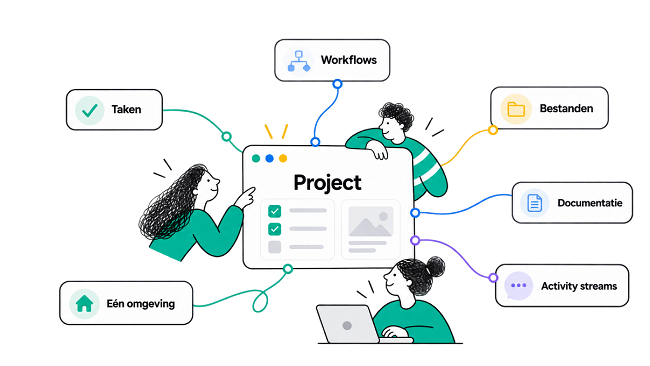
Projects run smoothly when everyone knows what needs to be done, where information lives, and what comes next. With Lucius Project tools, you can bring tasks, workflows, files, documentation, and updates together in one clear, organized environment.

Less searching. Less switching. More getting done.

Discover the Project tools ↓
Team working together on tasks, workflows, files, documentation, and activities in one project environment

ONE PLACE FOR THE ENTIRE PROJECT

Everything your project needs, all in one place

A project is more than just a list of tasks. It includes files, agreements, recurring steps, updates, and questions from different people.

With Lucius, everything stays connected. Everyone knows what's happening, and the team can keep moving forward with the same information.

01TasksWhat needs to be done?
02WorkflowsWhat steps do we follow?
03FilesWhere is the information?
04DocumentationWhat do we need to know?
05ActivityWhat has changed?

THE PROJECT TOOLS

Turn individual actions into one clear workflow

Everything you need to organize, manage, and keep track of your projects in one clear and structured environment.

01

Task board (Kanban)

See progress at a glance

Give every task a clear place within the project. With an intuitive Kanban board, you can instantly see what needs to be done, what's in progress, and what's already completed.

  • Organize tasks into clear stages
  • Assign ownership to every task
  • See progress at a glance
  • Make priorities visible to the entire team
Task board+ New task
To do 4
Collect contentMarketing
Create scheduleProject team
In progress 2
Homepage designLisa · Today
Process feedbackJeroen
Done 5
Kick-off✓ Completed
Project brief✓ Completed
02

Project workflows

Let recurring steps happen automatically

Many projects follow the same steps. With Project workflows, you define these processes once, so recurring tasks don't have to be reinvented or checked manually every time.

  • Standardize recurring processes
  • Make sure important steps aren't missed
  • Clarify responsibilities
  • Keep workflow progress visible
Website launchWorkflow active
✓
Review contentCompleted
✓
Approve designCompleted
3
Technical reviewUp next
4
PublishNext step
03

Project folders and files

Keep every file right where you need it

No more files scattered across inboxes, chats, and different storage locations. Store project documents centrally and give everyone access to the information they need.

  • Store documents centrally
  • Find files quickly and easily
  • Collaborate in the same environment
  • Keep information with the right project
Project files+ Upload
⌂Project documents12 files
PDF
Project brief.pdf2.4 MB · Today
•••
DOC
Content planning.docx890 KB · Yesterday
•••
XLS
Planning.xlsx1.2 MB · Monday
•••
FIG
Wireframes.fig4.8 MB · Monday
•••
04

Project documentation

Keep knowledge and progress together

Important information doesn't disappear when a meeting ends or a colleague is absent. Capture updates, agreements, and project information where the team can easily access and use it.

  • Share updates and information
  • Collaborate on documentation
  • Keep agreements and context in one place
  • Make information accessible to the project team
Documentation Project brief Objectives Planning Decisions Notes
LAST EDITED TODAY, 11:24

Project brief

Goal

Develop a new digital environment that customers and colleagues can use with ease.

Key agreements

Every Friday, we share progress and outstanding actions with the team.

05

Activity streams

Stay up to date without chasing people for updates

New tasks, changes, updates, and other activities remain visible within the project. No one has to keep asking what changed or where things stand.

  • See all project activity in one place
  • Quickly see what's changed
  • Reduce scattered updates and messages
  • Keep everyone in the loop
Activity streamAll
S
Sophie added Project brief.pdf.8 minutes ago
M
Mark assigned the task Homepage design to Lisa.32 minutes ago
L
Lisa posted an update in Website launch.1 hour ago
J
Jeroen completed Content review.2 hours ago

NOT FIVE SEPARATE TOOLS

One project environment where everything comes together

The real value lies in how everything works together. A task can be part of a workflow. A workflow can link to documentation. The files you need stay with the project. And the activity stream keeps everyone up to date on what changes.

The result is one connected project environment where people, tasks, and information come together.

Tasks Workflows Files Documentation Activity streams One environment
Projects ⌕ ◉ ●
PROJECT

New website

Active
Progress68%
18Tasks
7Files
12Updates
Complete wireframesToday
Content reviewTomorrow
Process feedbackFriday
✓
PROJECT STATUS Everything under control

The whole team works from the same information.

✓
PROGRESS 68% completed

12 of 18 tasks are complete.

MORE CLARITY, LESS HASSLE

Everyone knows where the project stands

Whether you're working with three colleagues on an internal project or collaborating with multiple teams and customers, everyone works from the same environment.

No scattered lists. No searching for the latest document. No endless messages just to find out the current status.

From the first task to final delivery: everyone knows what's happening.

CLEAR PROJECTS. EASIER COLLABORATION.

Bring structure to your projects. Make collaboration easier

Discover how Lucius brings tasks, workflows, files, documentation, and updates together in one connected environment.

Team working together on tasks, workflows, files, documentation, and activities in one project environment